




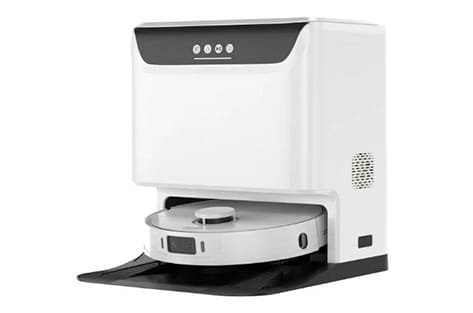
A self-emptying robot vacuum is a robot and dock system: after a cleaning run, the dock transfers debris from the onboard bin into a dust bag or collection chamber. For an OEM or private-label program, the user benefit depends on the exact robot, dock, bag, debris, maintenance steps and model configuration. A feature label or suction figure alone does not prove the full system’s performance.
DAYIN’s current X20Pro and X20ProAI-A product pages list automatic dust collection. Confirm the current specification, included dock and approved feature set for the exact model before preparing a retail claim or RFQ.
Define what self-emptying means for the SKU
Identify the robot model, compatible base station, onboard bin, dust bag or container, filter, seals, firmware and accessories included in the package. State whether the claim applies to a specific cleaning mode or debris type, and document any user steps needed for transfer, bag replacement or routine cleaning.
Use the same model code and configuration across the product specification, test report, packaging artwork, instructions and online listing. If a model is sold with different docks, bags or filters, state which combination the claim covers.
Validate dust transfer on the complete system
Agree a project-specific evaluation with the supplier or qualified test provider. Record the debris type and amount, floor surface, robot bin fill state, cleaning cycle, dock cycle, bag state, number of repetitions and inspection method. Measure how much debris remains in the robot bin and dust path, and check for blockage, leakage or visible dust release during docking and bag removal.
Repeat the evaluation under the conditions that matter for the intended market and claim. Do not treat one demonstration, one debris type or a dock-only check as evidence for every household, model or maintenance interval. Keep the protocol and results tied to the production-equivalent robot, dock, bag, filter and firmware revision.
Set bag capacity and maintenance expectations
Define how bag or collection capacity will be stated and supported, including the test fill conditions and the point at which the user should replace it. Check that bags and filters have clear part numbers, fit the compatible models and are available for the expected support period. Validate replacement steps, dust containment and the instructions shown to users.
If the product uses alerts for a full bag, blocked path or dock status, verify the indication and user instructions on the production software version. Avoid promises such as a fixed number of weeks between bag changes unless that interval is supported by the stated use conditions.
Measure noise and docking reliability by claim
Set a repeatable method for any noise, hands-free or reliability statement. Specify the operating mode, room or measurement setup, distance, surface and dock cycle. Confirm that the robot can return to and engage with the base as intended across the project test scenarios, and document failures or manual steps. Do not use a general word such as quiet or maintenance-free without defined evidence.
Plan service, packaging and market review
Agree the replaceable parts, spare-bag supply, filters, brushes, service instructions, warranty hand-off and support contact before launch. Check the shipped package for the correct robot, dock, bags, accessories, manuals, labels and model identifiers. For each destination market, ask a qualified compliance provider to identify the rules and documents that apply to the complete electrical, radio and battery-powered product. Keep reports and approvals tied to the exact model and revision.
Self-emptying robot vacuum RFQ checklist
- Robot and dock model codes, bill of materials, compatible bag and filter.
- Target customer, floor types, debris conditions, cleaning modes and intended claim.
- Dust-transfer protocol, acceptance criteria, noise method and docking checks.
- Bag capacity statement, replacement instructions, spare-part plan and warranty scope.
- App or firmware version, language and region requirements, packaging and labeling.
- Destination market, required compliance evidence, forecast volume and launch schedule.
Browse the DAYIN robot vacuum cleaner range to compare listed models. The robot vacuum OEM/ODM overview describes the B2B program scope. For adjacent technical checks, see the guides to suction paths and brush-tangle design, pet-hair performance and navigation options for OEM buyers. Send the target market, model scope, drawings, claim requirements and forecast through the DAYIN contact page.
Frequently asked questions
What does self-emptying mean on a robot vacuum?
It describes a dock transferring debris from the robot’s onboard bin into a bag or collection chamber. The actual included components and operation should be confirmed for the model and package.
How should a buyer test a self-emptying dock?
Agree a repeatable protocol for the complete robot-and-dock system, including debris, floor, bin and bag conditions, dock cycle, inspection method and acceptance criteria. Use production-equivalent parts and firmware.
Can a manufacturer advertise a fixed number of weeks before bag replacement?
Only when the interval is supported by evidence for stated debris, usage and maintenance conditions. Use instructions that match the tested configuration.
Are all robot vacuum docks compatible with every model?
No. Specify the exact compatible robot, dock, bag, filter and software revision for each product bundle.
What should an OEM RFQ include for a self-emptying robot vacuum?
Include model configuration, target market and claim, test conditions, acceptance criteria, bag and filter plan, app or firmware needs, packaging, compliance documents, forecast and launch timing.