




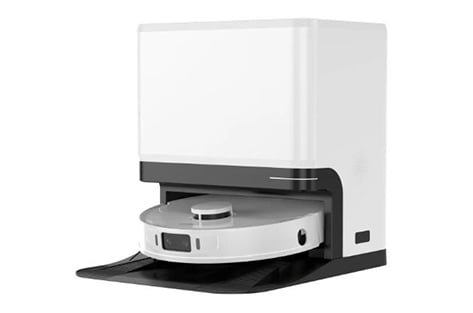
How do robot vacuums work? A robot vacuum combines a navigation system, onboard control software, drive motors and a floor-cleaning assembly. Sensors provide information about the room; the controller uses it to move the machine and coordinate cleaning. The exact sensor package, cleaning functions and dock features vary by model and target market, so buyers should confirm them against the product specification.
This guide explains the main subsystems and the configuration questions to settle when sourcing a robot vacuum through an OEM or ODM program.
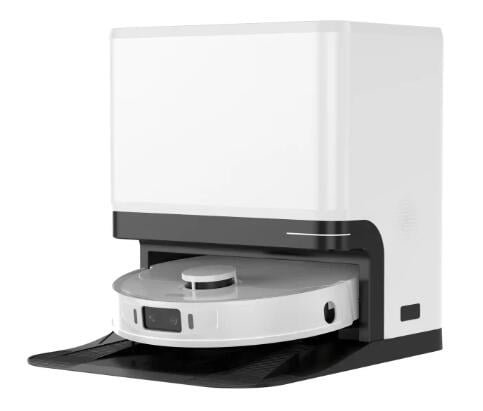
How do robot vacuums work as a system?
During a cleaning run, the robot estimates where it is, chooses a route, drives across the floor and operates its cleaning components. It may also communicate with an app or return to a dock, if those functions are part of the configuration. These tasks depend on hardware and software working together; a feature listed on a product page should be checked for the exact model and version being sourced.
1. Sensors help the robot navigate and map
A robot needs information about its position and nearby objects to move through a room. Depending on the design, that information may come from LiDAR, cameras, infrared or other proximity sensors, wheel encoders, an inertial sensor, bump sensors and cliff sensors. A product does not necessarily use every sensor type.
The navigation software uses available inputs to estimate movement and control the route. On mapping models, localization functions build or update a map to support planned coverage; simpler navigation designs may use different movement logic. A route planner adjusts movement when it detects an obstacle or a boundary. Sensor placement, calibration, firmware and the room environment all affect how a particular model behaves. For an OEM/ODM project, confirm the navigation method, supported mapping functions and relevant operating conditions instead of assuming that every robot uses the same approach.
2. Brushes and airflow collect debris
Most robot vacuums use some combination of a main roller, one or more side brushes, a suction fan, an air path, a filter and a dustbin. Brushes move debris toward the inlet or agitate material from the floor; airflow carries collected particles into the bin, where the filter retains dust. The layout and components vary by model.
Cleaning performance depends on the complete system and the test conditions, including floor type, debris, brush design, airflow, filtration and maintenance. A single suction figure does not describe how a machine will perform across every surface. When comparing platforms, ask which test method and floor conditions support the performance claims, and whether the design is intended for hard floors, rugs or a defined mix.
3. Drive, battery and control electronics coordinate movement
Drive motors turn the wheels, while separate control circuits operate the cleaning components. A rechargeable battery supplies power, and the control system manages movement and cleaning according to the selected mode. Runtime depends on the battery and the way the configured robot is used; it should be confirmed for the specific model and test conditions rather than generalized across a product category.
When the battery is low, a model with automatic docking can navigate back to its charging station. Whether it resumes an interrupted task after charging depends on the product’s software and configuration. Buyers should verify these behaviors in a sample or an agreed acceptance test.
4. Mopping and dock automation are configuration choices
Some models add a mopping assembly, such as a water reservoir, mop pad and controlled water delivery. Other platforms may offer mop lifting or a multifunction dock with selected maintenance functions. These are model-specific features; they are not standard on every robot vacuum. Confirm which functions are included in the quoted SKU, which require a different dock or accessory, and how consumables are supplied.
DAYIN’s robot vacuum OEM/ODM product page shows example platforms and model-specific features. Compare the current product specification and confirm the final configuration with the supplier before using a feature in a sales listing.
5. Apps and firmware connect the user to the machine
Depending on the model and target market, software may support scheduling, map controls, cleaning zones, status notifications or remote operation. Connectivity methods, supported languages, voice-assistant integrations and update processes can differ. They should be treated as requirements to confirm, not assumed category-wide features.
For a private-label launch, include the required app experience, brand presentation, language coverage, account or cloud requirements and after-sales update process in the project brief. Clarify which elements are already available and which would require development or validation.
What B2B buyers should define in an OEM/ODM brief
A clear brief helps a supplier recommend a suitable platform and identify decisions that affect cost, schedule and testing. Define:
- Target market and use: countries or regions, floor types, home layout assumptions and intended price segment.
- Navigation: required sensor approach, mapping behavior, obstacle handling and boundary controls.
- Cleaning configuration: brush and dustbin requirements, mopping needs, consumables and dock functions.
- Software and branding: app languages, user interface, integrations, packaging and private-label elements.
- Commercial scope: forecast volume, target cost, sample plan, customization scope and launch timing.
- Verification: performance test conditions, reliability checks, target-market compliance evidence and acceptance criteria.
These details let both sides distinguish an existing platform configuration from a requested customization. They also make it easier to compare supplier quotations on the same scope. DAYIN’s robot vacuum manufacturing capabilities page provides an overview of related OEM/ODM capabilities; project-specific scope and terms should be confirmed directly.
Frequently asked questions
Do all robot vacuums use LiDAR?
No. Navigation hardware differs by model. Some designs use LiDAR, while others rely on cameras or other sensor combinations. Check the specification for the exact model.
Does a higher suction rating guarantee better cleaning?
No single figure guarantees results on every surface. Brush design, airflow, filtration, floor type and test conditions also affect cleaning performance. Compare results using the same stated method and conditions.
Does every robot vacuum include an automatic-emptying or mop-washing dock?
No. Dock functions vary across models and configurations. Confirm which dock is included in the quoted product and which functions require optional hardware.
What information should I send for a robot vacuum OEM/ODM quotation?
Share the target market, expected volume, floor and cleaning requirements, navigation and software needs, branding scope, desired launch timing and required validation or compliance evidence. The supplier can then confirm platform fit, samples, customization scope and commercial terms for the project.
Discuss a robot vacuum project
DAYIN supplies robot vacuum platforms for OEM/ODM projects. Review the current robot vacuum models and manufacturing capabilities, then contact the team with your target market, product requirements and expected order volume for a project-specific discussion.